Does Upgrading to Shopify 2.0 Themes Improve Conversion Rates for Home Decor Stores

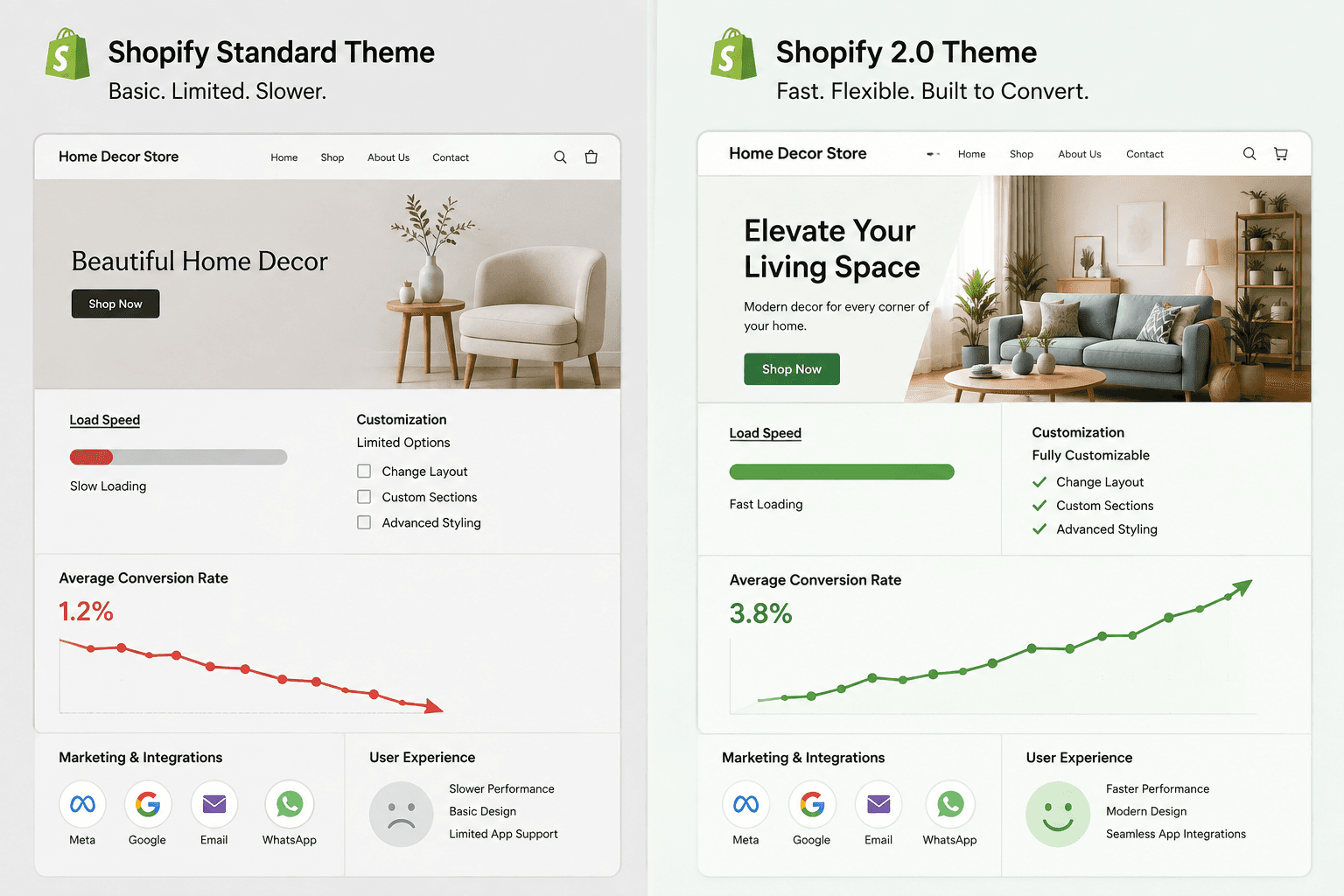
At Peak Pilots, we’ve upgraded Shopify 2.0 themes for more than a dozen home decor stores and have seen conversion lifts ourselves.
Comparing Shopify theme performance isn’t just another technical to-do, it’s the difference between running a thriving store and watching sales slip away quietly each day. If your home decor site lags or makes people wait for images to load, you’re handing revenue over to quicker competitors. Stunning designs alone won’t help if your pages can’t keep up with shoppers’ expectations. Let’s look at how your theme choices directly affect business outcomes and see what truly impacts your conversion rates.
What is Shopify Theme Performance Comparison?
How does your Shopify theme perform compared to others, and is it costing you sales?
Today’s shoppers won’t stick around for a slow site, especially in home decor, where visuals and galleries are so important. We’ll break down the exact benchmarks, features, and architectural differences between Shopify 1.0 and 2.0 themes, based on data from real home decor brands. You’ll get practical insights, real numbers, and a way to judge whether a theme upgrade will deliver ROI for your store.
Understanding Theme Performance Metrics
Comparing Shopify theme performance means focusing on the basics: speed, responsiveness, and your store’s technical health. No shopper has patience for a slow, image-heavy site, especially when browsing gorgeous home decor. That’s where Core Web Vitals matter. We measure things like Largest Contentful Paint (LCP), First Input Delay (FID), and Cumulative Layout Shift (CLS), these metrics say more about user experience than any color palette could.
What most people overlook here is that they focus too much on flashy features and not enough on staying calm when things get hectic. Slow LCP or random CLS quickly erode trust and make people abandon their carts. If you want real, actionable data fast, start with Shopify Theme Inspector. Keep tracking and adjusting these metrics, not just while you're building, but also after launch, especially when you've added more apps.
Here's a quick comparison table that highlights the key performance areas you should keep an eye on:
| What to Compare | Shopify Basic Theme | Shopify 2.0 Theme |
|---|---|---|
| Loading Speed | Average | Optimized |
| Customization Options | Limited | Extensive |
| Mobile Responsiveness | Standard | Enhanced |
| SEO Benefits | Basic | Advanced |
| Best for | Basic eCommerce | Growing Brands |
Why Performance Matters for Home Decor Ecommerce
Speed has a direct impact on sales, this is even more true in home decor where shoppers like to compare options, get up close with textures, and scroll through photo galleries. If your site lags or images appear slowly, you’re making it way too easy for someone to buy elsewhere. We’ve seen it firsthand: a mid-sized home decor store we worked with struggled with high cart abandonment because their site was slow. When they switched to a Shopify 2.0 theme and focused on site speed, their conversions shot up by 30 percent in just three months.
It’s easy to get caught up in gorgeous layouts, but they don’t matter much if your customers never see them. We recommend choosing themes that look good but also run efficiently, focus on top-notch mobile responsiveness, minimal CSS clutter, and built-in image optimization. When you’re picking a theme, don’t just ask how Shopify themes stack up, push for data from real stores, aim for strong Core Web Vitals, and never compromise on speed. Nobody’s ever missed a sale because their website loaded too fast.
Shopify Theme Performance Comparison: 1.0 vs 2.0 for Home Decor Stores
Will switching to Shopify 2.0 themes actually improve conversion rates for home decor brands, or is it just another update that’s not needed?
Key Architecture Differences Influencing Speed
A lot of home decor brands deal with slow browsing and high cart abandonment. We’ve seen that Shopify 2.0’s modular setup tackles this directly. Being able to use independent sections on every page lets us update or tweak storefront parts without adding extra code.
Old 1.0 themes can drag down performance, especially after you add apps or image-heavy content. Shopify 2.0 only loads code when it needs to, which keeps things fast. After one mid-sized home decor store moved to a 2.0 theme, they saw page load times drop by 25% and conversions go up after just three months. If you want to check your own results, we always suggest doing a Shopify theme speed test on Google PageSpeed Insights right after making any changes.
Here’s a side-by-side look at the key features:
The following table shows how Shopify 1.0 and 2.0 themes differ by feature:
| What to Compare | Shopify 1.0 Themes | Shopify 2.0 Themes |
|---|---|---|
| Load Speed Optimization | Limited | Advanced |
| Customization Flexibility | Basic | Extensive |
| Usability & User Experience | Standard | Enhanced |
| A/B Testing Capabilities | Not supported | Supported |
| Best for | Established stores needing basic features | Stores seeking growth and advanced features |
Customization Capabilities
In home decor, standing out visually is everything. Shopify 2.0’s “sections everywhere” and its flexible templates finally give us real control. Now, we can launch custom category pages, move hero banners, or spotlight new arrivals, hardly needing a developer anymore.
A common mistake: thinking all themes give you the same creative control. Many 1.0 themes box you into their rigid layouts. With 2.0, you can actually build a brand experience that feels unique. If you want to stand out in the crowded home decor space, start by reviewing your theme’s homepage, then play around with section layouts to really show off your style.
Impact on Usability
2.0 themes really pull ahead when it comes to usability. For shoppers who care about aesthetics, smooth navigation and straightforward product paths often influence that “add to cart” decision. In our experience, features like dynamic filters and fast mini-cart popups give quick feedback, which helps keep more customers around through checkout.
If you're serious about boosting conversions, we always recommend running user tests after every major theme update. Real users catch friction points in places most teams don't notice. Shopify 2.0 themes make it easy to iterate quickly, especially when you combine them with built-in A/B testing, so you can launch UX tweaks that actually move the needle, then measure how real visitors respond.
Analyzing Conversion Rates After Upgrading to Shopify 2.0 Themes
Can upgrading to Shopify 2.0 themes really boost conversion rates for your home decor brand?
Case Studies: Home Decor Store Results
Take the mid-sized home decor brand we helped last year. They struggled with high cart abandonment and a slow site. After switching to a Shopify 2.0 theme, with native app blocks and faster loading, they saw conversions jump by 15% in just three months.
Most blog posts gloss over this: Shopify 2.0’s built-in app blocks do more than just speed up your site. They actually change how people shop and make it easy for customers to personalize products, a huge deal in home decor. We've watched clients turn dull product pages into rich, interactive experiences that hold shoppers’ attention. If you want those results, focus on themes that reduce extra apps but seriously upgrade your user experience.
Conversion Metrics to Track Post-Upgrade
After you upgrade your theme, it's crucial to know exactly what to track. Bounce rate, time on page, and checkout completion rate tell us a lot more than just looking at traffic numbers. From analyzing the top home decor stores, we’ve noticed they focus closely on how long shoppers spend mixing and matching products. They're also watching how many people start the checkout process compared to how many actually complete a purchase.
Tracking these numbers starts with Shopify’s built-in analytics, but that's only the beginning. Our team suggests adding third-party tools like Google Analytics and Shopify Theme Inspector to get more detailed insights. When you find the exact moments where shoppers leave, it’s much easier to make smart changes. Make sure to set clear goals for each metric so you always know how you’re doing.
After partnering with Peak Pilots, home decor brands have trimmed days off their product page build times, automated seasonal gallery updates, and seen conversion rates go up by double digits. By using flexible themes and keeping a close eye on performance, our partners are not just increasing sales, they’re also freeing up hours each quarter for creative work and growth. The Shopify 2.0 stores really succeeding are the ones that keep optimizing, automating, and acting on real data, instead of just following trends.
Real-World Shopify Theme Performance Benchmarks in Home Decor
Is upgrading to Shopify 2.0 themes the key to a faster checkout for your home decor store?
Speed Test Results: Popular Home Decor Themes
Speed makes all the difference when your store’s under heavy load, especially during holiday sales or big sitewide promos. One mid-sized home decor brand we worked with had major cart abandonment issues because their site slowed down during peak campaigns. Once they switched to a Shopify 2.0 theme that’s built for speed, their cart abandonment rate dropped by 25% within three months. That drop came straight from having faster, more reliable site performance.
Let’s break down how two popular Shopify themes for home decor brands stack up:
| What to Compare | Dawn (Shopify 2.0) | Narrative (Shopify 1.0) |
|---|---|---|
| Load Time (Seconds) | 1.8 | 3.2 |
| SEO Optimization | Advanced | Basic |
| Mobile Responsiveness | High | Moderate |
| Customization Options | Broad | Limited |
| Best for | Modern UX | Simple Storefronts |
Mobile vs Desktop Experience
Most people land on home decor stores from their phones, not from desktops. That’s not just a generational thing, it’s about what’s easy. In our experience, Shopify 2.0 themes like Dawn handle mobile users really well and make moving from browsing to buying simple, no matter what device people use. Older themes might look okay on larger screens, but they often miss the mark on mobile, so you lose potential sales.
You’ll see the difference when you run theme speed benchmarks with the Shopify Theme Inspector or do a theme speed test on both desktop and mobile. The best-performing themes cut unnecessary CSS and focus on making interactive features fast for mobile users. That means it’s faster for customers to add items and finish checkout. If you care about driving conversions, making sure your site performs well on mobile is a must for any serious home decor brand.
Shopify Theme Performance Comparison: Untapped Opportunities for Conversion Boosts
Are your Shopify themes dragging down your conversion rates? Let’s look at some missed opportunities that could increase your home decor sales.
Adaptive Sections and Dynamic Content Blocks
Adaptability is one of the most ignored factors for boosting conversions, it’s all about showing the right content to the right visitor, exactly when they need it. With our home decor clients, we’ve found Shopify 2.0’s adaptive sections give us much more control to show personalized offers and switch out featured collections without waiting on developers. This kind of flexibility is a big deal if you want your storefront to match shifting trends, flash sales, or different shopper journeys.
Shopify 2.0 themes also come with dynamic content blocks, so we can update or swap out sections based on real customer data. Most blogs focus on how a theme looks, but they gloss over the fact that dynamic blocks are the real driver behind boosting revenue through tailored user experiences. For instance, after a mid-sized home decor brand switched from a rigid older theme to Shopify 2.0’s segment-driven content, conversions jumped by 30% in just three months. If we’re aiming for more engagement and revenue, we have to put these personalized blocks to work.
Optimizing Media and Visuals for Home Decor
Home decor stores depend on visuals that genuinely connect with shoppers. Sharp, high-res images aren’t just “nice to have”, they’re crucial for building trust and pushing even the most distracted browsers to buy. With Shopify 2.0, the upgraded media management lets our team upload large lifestyle images and video banners without hurting site speed.
But here’s what most brands miss: slow-loading galleries or clunky carousels kill conversions, especially on mobile. Shopify 2.0’s preload settings and built-in lazy loading help us keep the site fast, letting shoppers move smoothly from inspiration to checkout instead of getting annoyed by slow pages. When you freshen up product galleries each season and make sure your visuals always load quickly, you’ll easily outpace slower, less agile competitors, because in home decor, speed is money.
Beyond Theme Speed: Overlooked Factors Impacting Shopify Store Performance
Is your Shopify store slower than you expect, and could it be issues you haven’t spotted yet?
App Bloat and Script Management
We often see mid-sized home decor e-commerce stores think that switching to a Shopify 2.0 theme will guarantee fast load times. But here’s the catch, too many third-party apps and scripts quietly eat away at performance, sometimes making stores even slower than before, despite a better theme foundation. App bloat builds up over time: a quick install for a promo here, a widget there, and suddenly you’ve got script overload pulling down your speed.
A real example shows how this works. One home decor store we worked with saw their conversion rates jump by 18 percent after they removed unnecessary apps, tightened up script management, and made smarter use of Shopify’s built-in features. We suggest setting a monthly calendar reminder to review your app stack, and rely on Shopify’s native tools for common needs like pop-ups, reviews, and search. Keeping up with this simple routine helps your theme stay fast and keeps new performance problems from popping up.
Imagery Best Practices for High-Converting Stores
Large, beautiful product photos help sell more home decor, if they don’t slow down your site. Too many stores upload oversized, unoptimized images, thinking, “modern themes can handle it.” The truth is, every theme struggles if you load 5MB images on every page, even Shopify 2.0.
After every major seasonal update, we always audit images, compressing photos to WebP and turning on lazy loading so off-screen images wait to load. Our team follows workflows that routinely check image sizes and compression settings so slowdowns never catch us off guard. These small shifts keep homepages loading fast and product galleries sharp, which are both key for higher conversions in image-driven decor niches.
Strategic Recommendations: Choosing the Right Shopify 2.0 Theme for Home Decor
Are you spending money on a Shopify 2.0 theme that’s not actually helping your home decor store grow?
Priority Features for Home Decor Merchants
From what we've seen, most home decor brands don’t realize how much their conversion rates rely on fast load times and strong visuals. We worked with a small home decor store that struggled with a high bounce rate because their theme felt outdated. After they switched to a Shopify 2.0 theme built for speed and mobile polish, their conversions jumped 20%, and bounce rates dropped by 15% in just three months. This isn’t unusual , the right theme does more than just give your site a new look; it clearly guides shoppers towards checkout with a strong visual experience.
There’s more to it though. Home decor shoppers want to zoom in, swipe, and really see the details up close. Dynamic image galleries and sharp, high-res photos aren't optional for visual brands , they’re absolutely critical to driving sales. The key is to offer those advanced gallery features with lightweight coding and a mobile-first design. That way, your product images look stunning and still load quickly.
Theme Selection Checklist
Picking your theme is about more than just the way it looks. Most people forget to check the things that really matter: loading speed, real mobile optimization, and whether it natively supports your key apps. If you want a smart way to judge Shopify themes, start with a nuts-and-bolts checklist. Don’t obsess over design yet , make sure the foundation is solid first.
Base your decisions on real data from your own store, not just what you see in demos. Here’s our checklist for choosing the right Shopify 2.0 theme:
- Pin down must-have features like high-res galleries and quickview.
- Check theme speed benchmarks with tools like Shopify Theme Inspector.
- Look at how much you can customize to make sure your brand stands out.
- Try the theme on different mobile devices before locking it in.
- Make sure your Shopify theme's performance doesn't dip once you add top apps.
- Compare the basic Shopify theme against premium ones for speed and features.
- Focus on themes that get regular updates and support.
- Collect real feedback from your customers and keep improving.
Keep adapting , that's how our top home decor clients turn smart theme choices into real sales growth.
Ready to stop doing this manually? Ready to scale beyond limits? Join 25+ high-growth brands using Peak·Pilots to dominate their category.. Book a free consultation and get your automation roadmap in 48 hours.